Aangepast Font Laden in WordPress (met Child Theme & CSS)
Dit werkte niet perfect, dus voor nu gebruik ik Custom Fonts van Brainstormforce
- Font Downloaden:
Download het gewenste font van Google Fonts - Font Converteren:
Zet de fontbestanden om naar.woffen.woff2via Transfonter - Bestanden Uploaden:
Upload de geconverteerde.woffen.woff2bestanden naar defontsmap in je child theme (bijv.wp-content/themes/blocksy-child/fonts/). - CSS Toevoegen:
de volgende CSS toe aan je child theme, in destyle.css:
/* Extra fonts laden */
@font-face {
font-family: ‘Averia Libre’;
src: url(‘wp-content/themes/blocksy-child/fonts/AveriaLibre-Regular.woff2’) format(‘woff2’),
url(‘wp-content/themes/blocksy-child/fonts/AveriaLibre-Regular.woff’) format(‘woff’);
font-weight: normal;
font-style: normal;
font-display: swap;
}
@font-face {
font-family: ‘Averia Libre’;
src: url(‘wp-content/themes/blocksy-child/fonts/AveriaLibre-Bold.woff2’) format(‘woff2’),
url(‘wp-content/themes/blocksy-child/fonts/AveriaLibre-Bold.woff’) format(‘woff’);
font-weight: bold;
font-style: normal;
font-display: swap;
}
/* Voeg andere font-stijlen toe zoals Italic of BoldItalic indien nodig */
.averia-kop {
font-family: ‘Averia Libre’, sans-serif !important;
}
Geavanceerd – css klassen – averia-bold.
Werkt alleen voor paragraph, niet voor headers.
Fonts variaties vanuit plugin Custom Fonts:
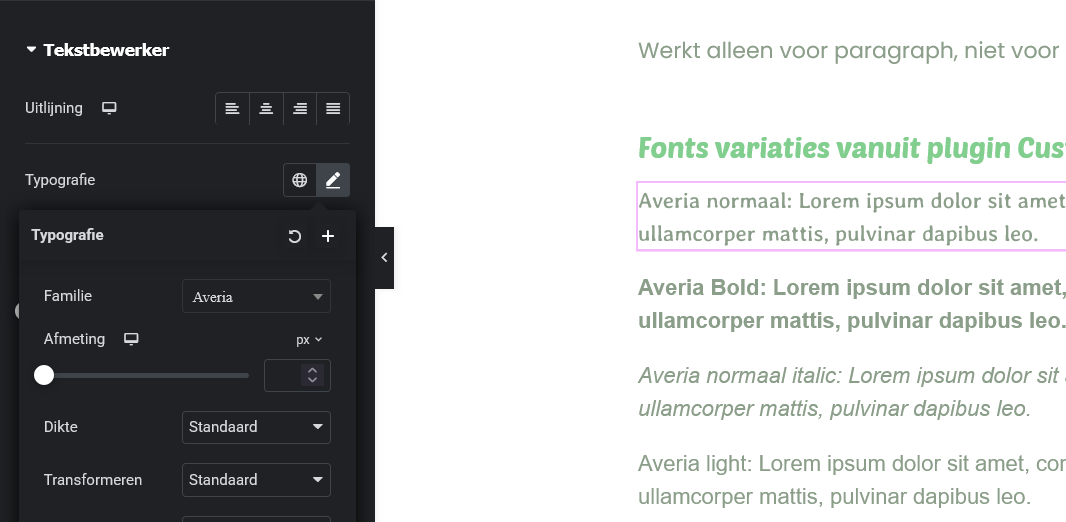
Averia normaal: Lorem ipsum dolor sit amet, consectetur adipiscing elit. Ut elit tellus, luctus nec ullamcorper mattis, pulvinar dapibus leo.
Averia light: Lorem ipsum dolor sit amet, consectetur adipiscing elit. Ut elit tellus, luctus nec ullamcorper mattis, pulvinar dapibus leo.
Averia vet: Lorem ipsum dolor sit amet, consectetur adipiscing elit. Ut elit tellus, luctus nec ullamcorper mattis, pulvinar dapibus leo.
Averia vet italic: Lorem ipsum dolor sit amet, consectetur adipiscing elit. Ut elit tellus, luctus nec ullamcorper mattis, pulvinar dapibus leo.